Smart bidding, Performance Max and every automated advertising tool share one weakness: they’re only as good as the conversion data you feed them. If your tracking counts the wrong things, counts them twice or misses them entirely, your ad platforms will confidently optimise toward the wrong outcome. These are the GA4 tracking mistakes we find most often in Australian accounts, and how to fix them.
1. Marking the wrong events as key events
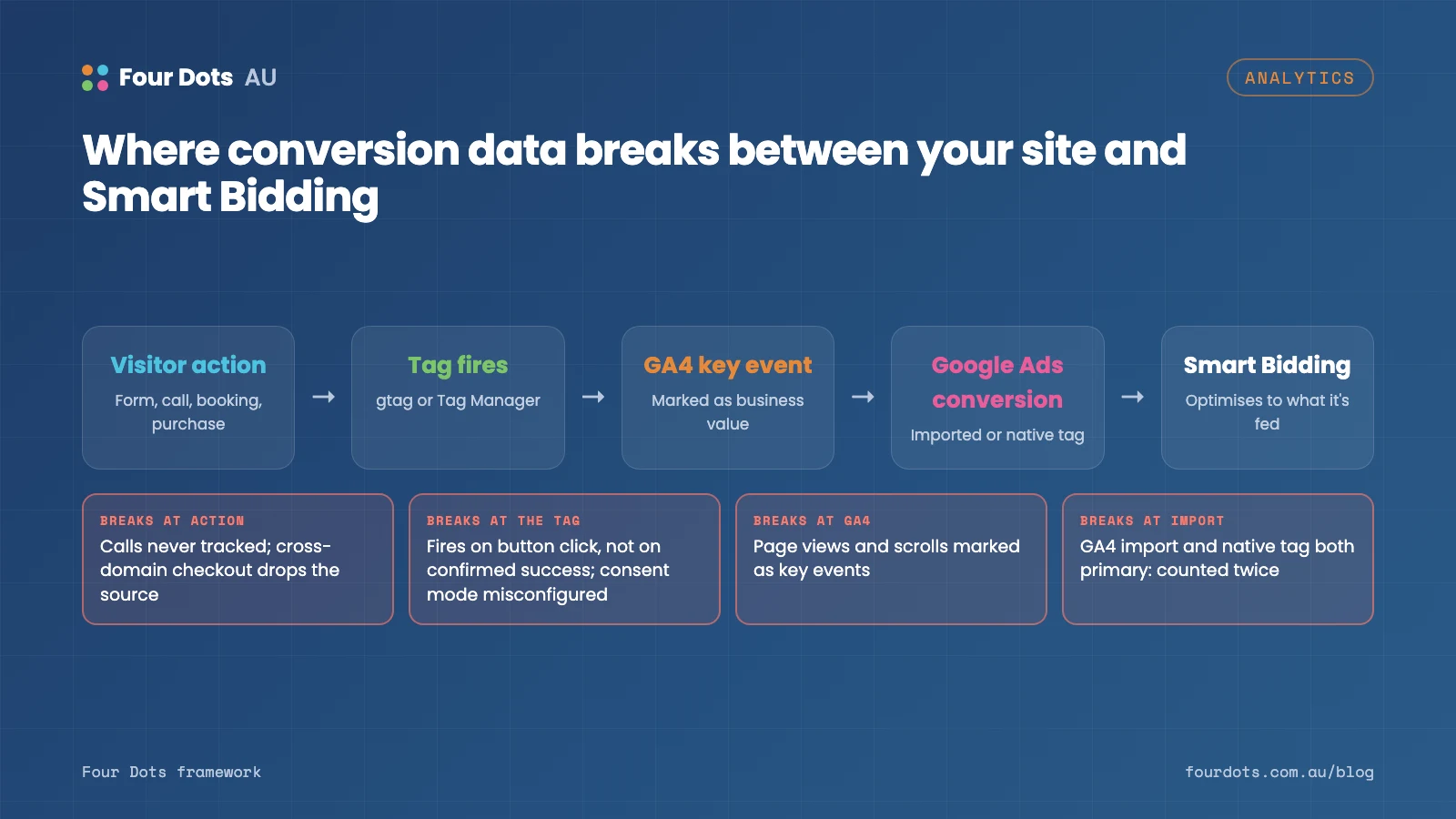
GA4 lets you flag any event as a key event (previously called a conversion). It’s common to find page views, scrolls, outbound clicks or “contact page visits” marked alongside genuine leads and sales. If those are then imported into Google Ads as primary conversions, bidding will chase cheap, meaningless actions. Keep primary conversions to actions that represent real business value: completed purchases, submitted enquiries, booked appointments and qualified phone calls.
2. Counting form submissions that didn’t happen
Many sites track a form “submission” when the button is clicked, not when the form is successfully sent. Validation errors, spam blocks and failed submissions all get counted. Trigger the conversion on a confirmed success: a thank-you page, a success message appearing, or a dedicated event fired by the form plugin after it sends.
3. Duplicate conversions
Double counting is surprisingly common. Typical causes include:
- the GA4 tag installed both directly in the site and through Google Tag Manager;
- thank-you pages that fire the event again when refreshed or revisited;
- importing GA4 key events into Google Ads while also running the native Google Ads conversion tag for the same action, with both set as primary.
Compare conversion counts with your CRM or order system. If GA4 reports noticeably more leads than you actually received, something is double counting.
4. Ignoring phone calls
For many service businesses, most enquiries come by phone. If calls aren’t tracked, your reports undervalue the campaigns and pages that drive them. At a minimum, track clicks on phone numbers. Better still, use call tracking that records actual calls and their duration, and import qualified calls into your ad platforms.
5. Losing attribution through cross-domain journeys
Booking engines, payment gateways and third-party form tools often live on a different domain. Without cross-domain tracking configured, users appear to leave your site and return as new sessions, and conversions get attributed to “referral” from your payment provider rather than the campaign that drove them. Configure cross-domain measurement in GA4 and add payment gateways to the unwanted referrals list.
6. Consent mode not set up properly
If your site uses a cookie consent banner, consent mode needs to be implemented correctly so Google’s tags adjust their behaviour based on each visitor’s choice. A misconfigured setup can either block measurement unnecessarily or collect data without valid consent. Test the banner in each state (accepted, rejected, no choice yet) and confirm tags behave as expected.
7. Ecommerce data that doesn’t match reality
For online stores, check that purchase revenue includes or excludes GST and shipping consistently, that currency is set to AUD, that refunds are handled, and that each transaction ID is unique. Mismatched revenue makes return-on-ad-spend figures meaningless.
8. Never testing after changes
Website updates, new themes, plugin changes and form rebuilds regularly break tracking without anyone noticing. Build a short checklist and test every key conversion after significant site changes, using GA4’s DebugView and Tag Assistant.
Quick reference: symptoms and fixes
| Mistake | Symptom you’ll notice | Fix |
|---|---|---|
| Wrong key events | Cheap “conversions”, few real leads | Keep primary conversions to leads, sales, bookings, qualified calls |
| Button-click tracking | More conversions than CRM entries | Fire on confirmed success (thank-you page or success event) |
| Duplicate tags or imports | Roughly double the real count | One tag source; one primary conversion per action |
| No call tracking | Phone-heavy campaigns look unprofitable | Track number clicks and real calls; import qualified calls |
| Missing cross-domain setup | Conversions credited to payment gateways | Cross-domain measurement plus unwanted referrals |
| Consent mode errors | Sudden data gaps or no change on rejection | Test every banner state |
| Ecommerce mismatches | Revenue that doesn’t match the store | Consistent GST/shipping, AUD, unique transaction IDs |
FAQ
What’s the difference between a key event and a conversion?
In GA4, “key event” is the current name for an event you’ve marked as important. “Conversion” now refers to conversions used in Google Ads. You can import GA4 key events into Google Ads as conversions.
Should I use GA4 imports or the Google Ads tag?
Either can work. The Google Ads tag is often more precise for bidding; GA4 imports keep one source of truth. The mistake is having both set as primary for the same action.
How do I check if my conversion tracking is accurate?
Compare a month of conversions in GA4 and Google Ads with your CRM or order system. Large gaps in either direction mean something needs fixing. Our conversion tracking setup service does this audit for you.
Get the foundations right
Fixing tracking is rarely glamorous, but it often produces the biggest improvement an ad account will see, because every automated decision suddenly gets better information. If you’re not confident your numbers are right, our Google Analytics specialists can audit your setup and fix it properly, and our PPC team can make sure your campaigns use that data well. If you’re weighing up campaign types, read Performance Max vs Search campaigns next.