Large websites accumulate technical debt the same way large codebases do. Every migration, platform change, marketing campaign and quick fix leaves something behind: redirect chains, orphaned pages, duplicated templates, legacy parameters and rules nobody remembers writing. Individually each issue is minor. Together they waste crawl capacity, dilute authority and make every new SEO initiative harder to deliver.
What SEO technical debt looks like
- Redirect chains and loops left over from several rounds of URL changes.
- Index bloat: thousands of thin, filtered, paginated or parameter-driven URLs competing with your important pages.
- Duplicate and near-duplicate content across regions, categories or legacy subdomains.
- Inconsistent canonical, hreflang and robots rules applied differently across templates.
- Orphaned pages that still exist and are indexed but are no longer linked internally.
- JavaScript rendering problems where key content or links only appear after client-side scripts run.
- Performance regressions from accumulated scripts, tags and third-party widgets.
Why it matters more at scale
On a small site, search engines can crawl everything regularly regardless of inefficiency. On a site with hundreds of thousands of URLs, crawl resources are finite; Google’s crawl budget guide is written specifically for large and frequently updated sites. If search engines spend their time on redirects, duplicates and low-value parameters, new and updated pages get discovered and refreshed more slowly. Authority from internal and external links is also spread across duplicates instead of concentrating on the pages that should rank.
| Issue | Where to find it | Typical fix |
|---|---|---|
| Redirect chains | Crawl, redirect map, server logs | Point every redirect at the final URL |
| Index bloat | Search Console page indexing, sitemaps vs crawl | Noindex, canonicalise or remove low-value URLs |
| Duplicates | Crawl similarity reports | Canonical tags, consolidation, 301s |
| Faceted URLs | Logs, parameter reports | Facet rules, robots.txt, canonicals |
| Orphaned pages | Sitemaps and analytics vs crawl | Link internally or retire |
| JS rendering | Rendered vs raw HTML comparison | Server-side rendering for key content and links |
Step 1: Build an inventory
You can’t prioritise what you can’t see. Combine a full crawl, XML sitemaps, Search Console’s page indexing report, analytics landing pages and, ideally, server log files. Log analysis is especially valuable on large sites because it shows what search engine crawlers actually request, not just what exists.
Step 2: Prioritise by impact and effort
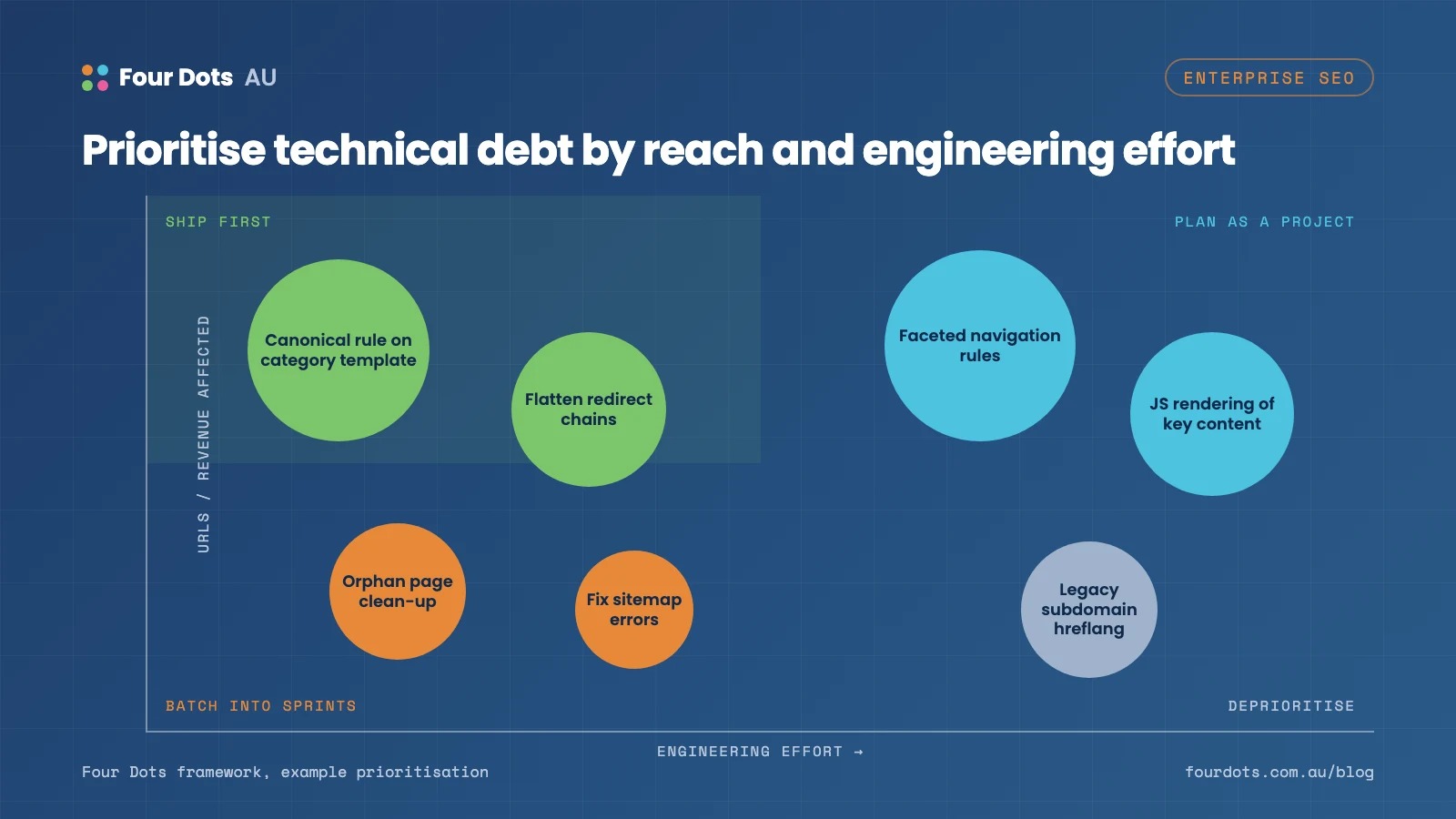
Score each issue on how many important URLs it affects, how much revenue or traffic those URLs drive, and how hard the fix is for your development team. Template-level fixes are usually the best value: correcting a canonical rule on a category template fixes thousands of pages in one release.
Step 3: Work within the development process
Enterprise SEO lives or dies on engineering capacity. Write tickets developers can act on, with clear acceptance criteria, example URLs and the expected outcome. Group related fixes so they fit into sprints. Agree on SEO checks for the release process so new debt isn’t created as fast as old debt is removed.
Step 4: Prevent new debt
- Add automated checks for status codes, canonicals, noindex tags and robots.txt changes before deployment.
- Maintain a central redirect map and update existing redirects to point directly at final URLs.
- Document rules for faceted navigation and URL parameters.
- Include SEO in migration and replatforming plans from the start, not the week before launch (our SEO migration services exist for exactly this).
- Monitor key templates for performance and rendering changes.
Step 5: Measure the payoff
Track crawl efficiency in log files, the ratio of indexed to valuable URLs, the speed at which new pages are indexed and, ultimately, organic traffic and revenue for affected sections. Reporting results in business terms is what secures engineering time for the next round.
FAQ
What is crawl budget and does it matter for my site?
Crawl budget is how many URLs Google can and wants to crawl on your site. Google says it mainly matters for very large sites or those that change frequently; most sites under a few thousand pages don’t need to worry.
How do we get engineering time for SEO fixes?
Translate issues into business impact: affected revenue, pages and traffic. Write tickets with acceptance criteria and example URLs, and bundle related fixes into a single release.
Are server logs really necessary?
On large sites, yes. Logs show what crawlers actually request, which is often very different from what a crawl tool or sitemap suggests. A technical SEO audit should include them.
Need a partner for large-site SEO?
We work with in-house marketing and engineering teams on complex, high-traffic websites. Our enterprise SEO service focuses on prioritised, developer-ready recommendations, and our Rent.com case study shows what’s possible on a site operating at serious scale.